LiFi: Light Fidelity (Better WiFi)


LiFi means Light fidelity. It is a network technology which can be used to communicate within a network wireless. it much faster that WiFi, it can transfer upto 10Gbit/s. it is invented by Harlad Haas, teaching at University of Edinburgh in 2011. 

How it works:

LiFi uses visible light from a light bulb which is basically work at very high frequency almost 400 and 800 THz. So basically you will be connected to the network as long as you will be under the visible light, basically that will be a bulb equipped with LiFi technology. As soon as you will be out of the room or not under the light it will disconnect you from network. 

LiFi as much i understood from TED talk work in Morse code that is it flicks LED light so fast which is not easily detectable by human eye. 

It is able to transfer 224 gigabits/sec of data during a lab record.

A Driver will be connected to the LED, which will flicks the light at very fast rate in Morse code, which can be received by Photo detector and changes the code into electrical signal which is converted into data stream.

Advantages:
1. Greater speed rates than WiFi.
2. Increase Security.
3. Decrease Wires overhead as it can be installed into the building infrastructure.
4. Decrease access points deployment as a network of these bulbs can be deployed all over the building where network access is necessary.

Disadvantages:
1. Maybe the cost of technology can increase.
2. New devices may need to be equipped with this new technology(photon sensor), so that they can send or receive data

Potential:
This technology has great potential, if they are able to deploy it in regular life, it will change our thinking about technology, we can work at the speed of light.

Video Link:
https://youtu.be/NaoSp4NpkGg (Do visit and see potential)
References:
http://purelifi.com/

Use USB Pendrive as LOGIN Key


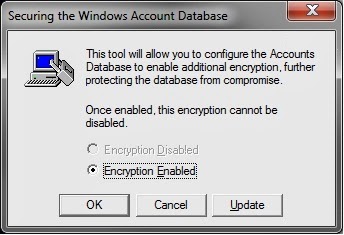
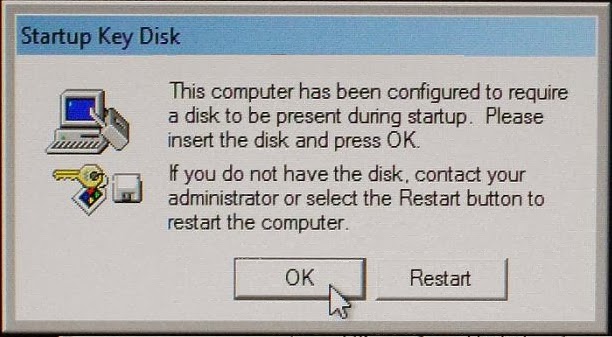
Syskey is a built-in feature of Windows Operating systems. It protects user against offline password cracking attacks. You can store Syskey on a Pen drive so that every time you Power-On the PC it will ask for Pen drive (which has Startkey in it) and then it will allow you to log in the Windows.
Configuring Pen drive :
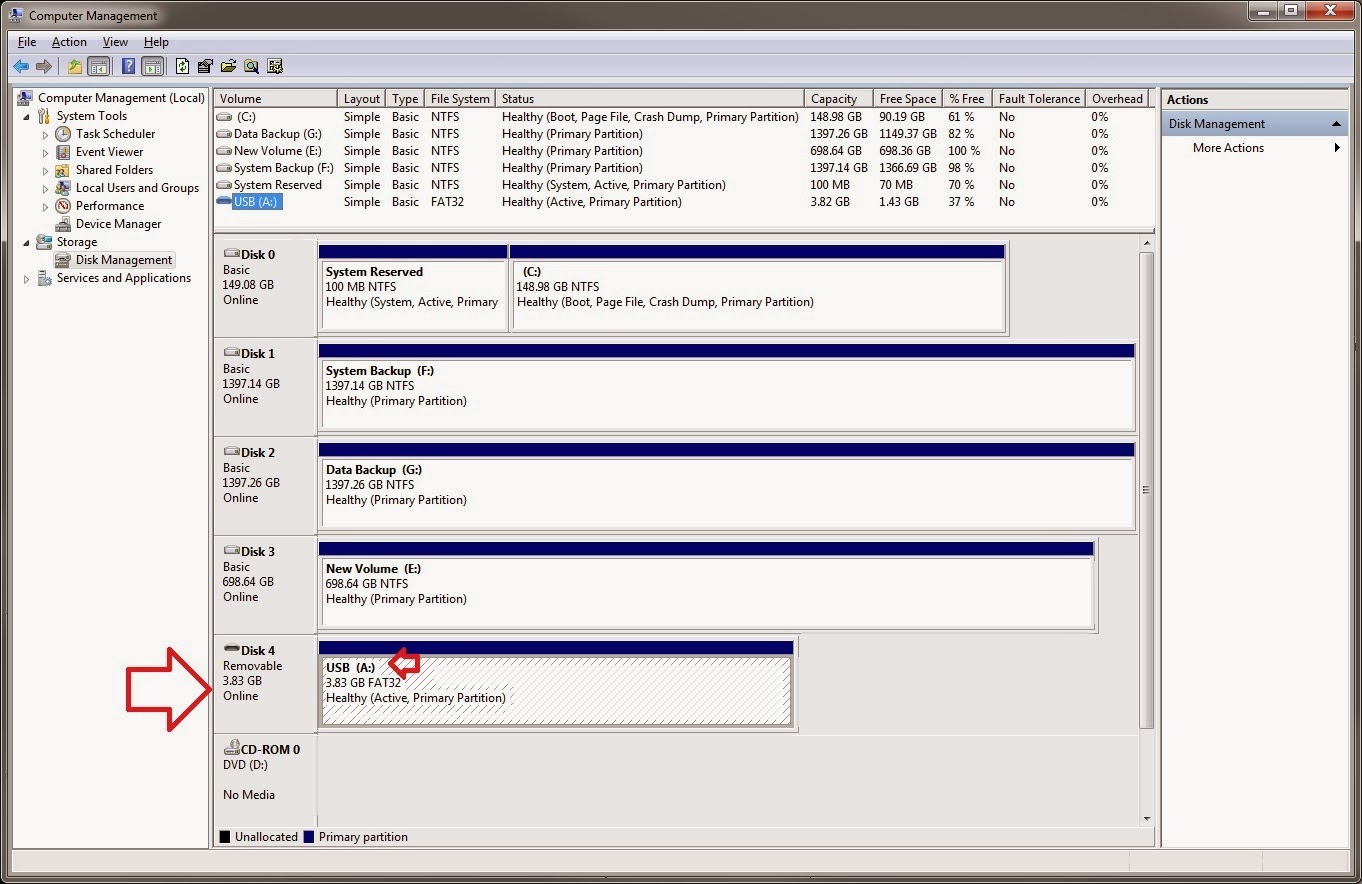
Before generating a Syskey, you have to configure the pen drive. We need to change the drive letter of pen drive to "A:"( b'cos in Windows A: drive is considered as floppy disk drive).you can do this by following these steps:
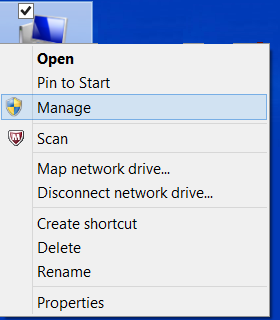
  • Right click on my computer and select manage.
 
  • Select disk manangement.
  • Right click on your pendrive name and select change drive letter. 
  • Select drive letter "A:" from drop down list and click OK. 
  • Now your USB pendrive drive letter will be A onwards. 
Generating SYSKEY :
Now our next task is to generate Syskey and save it to the pendrive. You can follow these following steps to generate Syskey:
  • Press Window+R key and type syskey in dialog box 
  • Click yes, when prompted UAC. 
  • Click on Update. 

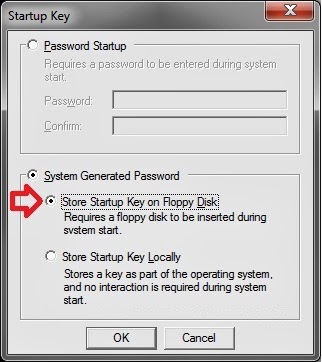
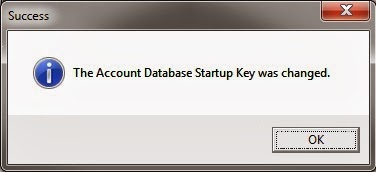
  • Select System Generated Password, Select Store Startup Key on Floppy Disk and click OK. 

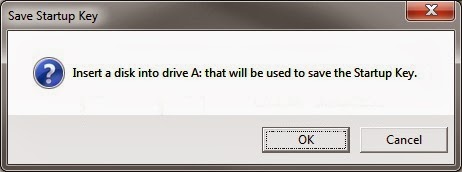
  • Connect the USB Pen drive with letter of A and click OK. 

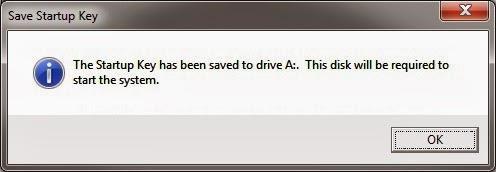
  • Click on OK. 

  • Click on OK. 

  • Now you will need this USB pendrive everytime when you boot your computer to able to login into windows. 

NOTE: You can backup the Syskey by copying Startkey.key in a safe place. In case you lost the current pendrive or it gets damaged. Then just change the drive letter and copy the Startkey.key file to the root of the new USB Pendrive.

Window 8 consumer preview


Window 8 is here for consumers. Microsoft releases first beta version for consumer to test on their system. It is available for download from Microsoft website in ISO file. which can be converted into DVD installation media or a bootable USB flash drive. If you have Windows 7 running, you can use theWindows Disc Image Burner, but other versions will require a third-party program.
NOTE:-Windows 8 Consumer Preview is prerelease software that may be substantially modified before it's commercially released.

                   The new OS does many firsts for Microsoft, it offers versions for both ARM and x86 hardware, and, features an alternate Metro UI, with touch-friendly apps, enabling support for portable devices like tablets. 

System requirements are the same as that for Windows Vista and Windows 7, as mentioned below:

  • 1 GHz or faster 32-bit (x86) or 64-bit (x64) processor
  • 1 GB RAM (32-bit) or 2 GB RAM (64-bit)
  • 16 GB available hard disk space (32-bit) or 20 GB (64-bit)
  • Graphics card supporting DirectX 9 or higher
  • A internet connection for web store.
Download:Window 8 beta

Hello,Little Printer

Little printer, a new printer by bergcloud which uses thermal printing to print you the latest news, picture of day, new puzzle, birthdays reminders, agendas, tracking your health everyday.
       It is like your own newspaper printing press. You have to just plug it into a power outlet and its zero config. let it connect to wireless using berg brigde. Berg cloud let you connect to the printer through your smartphone. You can subscribe to any service provides and let the printer print it for you. Its inkless technology makes it less maintanable device. Just place it in your front room and let it print the information of your choice. You can print your to-do list, grocery list, birthday reminders, daily puzzle. It will be available in 2012 but a fixed date is not confirmed. You can subscribe to a mailing list which gives you the latest news about this little printer. You can also let the your Nike running coach to print your achivements. 
No price details is out now. But soon pre-order will be started.
"It might not be Big, But it's very clever":-Mac User

Alan wake finally for PC

After the release of Alan wake for Xbox. Alan wake is now come to the PC for gamers almost after 2 years. The game only available by Steam.
                      The game has been tweaked to take full advantage of Quad-Cores processors. It will have better Graphics and 3d support and also gamepads compatibility.
                      The Title cost for $30(Rs.1500) and download size is 8GB. Buy it before 23rd to get access to download collectors edition. Before buying make sure you have:
1. Dual core 2ghz Intel or AMD 2.8 ghz.
2. 512 MB Directx compatible Graphic card.
3. 2GB of RAM.
        

Make your desktop into 3d desk with BUMPTOP


Transform it with BumpTop into 3D desktop that help you keep organized. Like a real desk. Create the desktop that suits your needs and style.
There’s nothing about the installation, you just keep on pressing “Forward” and you are done. When you launch BumpTop for the first time, you’ll be taken in tutorial to show you how to use BumpTop efficiently, it doesn’t last more than a minute so make sure you watch it.
 
Pros
  • Very intuitive
  • Impressive design
  • Customizable appearance
  • Icons behave like real-life objects

Cons
  • High system requirements
  • Beautiful, but not that useful after all
 Note that BumpTop was bought by Google on May 2010, and is no longer available for download.
DOWNLOAD LINK:-BUMPTOP 3d


A Gaming console for Rs.7500

Chinese firm JXD launches new android based gaming console. although it is not a danger for Sony Vita, but it is for Budget gamers. They named it as S7100.
          The main specifications are 7" capacitive touch screen with 800x600 resolution, 1Ghz processor under the hood, and aMali 400 GPU. Other specs include 512 MB DDR2 RAM, 2MP rear camera and VGA as a secondary camera, Wifi, HDMI-OUT, TV-OUT,8/16 GB storage. According to manufacture, it has Anroid 2.2 froyo and is a combination of gaming console and tablet. It has D-pad, face buttons and a thumb stick. It can also emulate SonyPSONE, Nintendo GBA, Sega Mega Drive games.
         And mainly the JXD site is fully rip-off of Apple's Site, Check it out here: JXD WEBSITE. You can order S7100 for $140(Rs.7500) By Clicking here. 

This is truely different from all other devices, as i can't see Iphone's icons, Symbian wallpapers and playstation keys all in one device.

Specification:

  • CPU: ARM Cortex A9, mail 400 GPU 3D
  • RAM: 512M DDR2
  • Screen: 7" 800x480 touch screen
  • System: Google Android 2.2
  • Conectivity: WiFi 802.11g/g/n
  • Simulator Games:Perfect support Arcade games, Nintendo 64 bits 3D games, Sony PS1 games, Nintendo GBA games, Sega MD games
  • Camera: Dual Camera (Front: 0.3M pixels, Back: 2.0M pixels)
  • On line function: Support Email, MSN, Facebook and Skype etc
  • On line video: Support Youtube, TED mobile, BBC news etc
  • Application: Support 10,000 application and software free download, such as Office software and study tools
  • TV out: HDMI output
  • Ebook: PDF, TXT, CHM, UMD and HTML etc
  • G-sensor
  • Picture: JPG, BMP, PNG etc, Picture browsing and slid playing
  • Speaker: support
  • size: 238.5x121.7x12.35mm
  • USB2.0 high speed
  • earphone

Get any driver

  • ·         Facing problem in downloading the drivers for particular device??
  • ·         How to get old drivers setups?
  • ·         Where to Get the lastest version of drivers???
Are you tired looking or searching for a particular driver for a hardware and you can't find it. Here are some sites which will help you to find drivers of devices or hardware. You can search driver for hardware which are upto 10 year old. These sites will help you when you install new OS on laptop or netbook and you don't have any driver CD. 
  Go to these sites directly and download the driver
==>Here this website generally contains the lastest drivers as well as the drivers which are rare to find on net …this also contains the drivers of computer 10yrs back.
==>Here is the website which contains driver for notebooks.

How to make command prompt wider in window 7

It can be annoying when you’re using the default Command Prompt window settings and not being able to read everything easily. Many says it in window 7 it is not possible to make command prompt to show on fullscreen. Here are the steps you can make command prompt wider.
1.Open the command prompt.
2.Right click on the title bar and click properties.
3.Now select the Layout tab and change the Window Size width, by default it is 80. Here you can change the Screen Buffer Size Width and Window Position. When you’re finished click OK.
4.Now the window is wider and when we run the same command above, we can see all of the data in a much easier to read format!


------------------------------------------------------------------------------------------------------------

Motorola Xoom 2

The Xoom 2 has shed a lot of weight, which puts it at 599g and slimmer as well, measuring just 8.8mm, which is just shy of the size zero Galaxy Tab 10.1. Motorola have stuck with the Tegra 2 T20 chipset, but bumped up the speed a little to 1.2GHz. At launch, the Xoom 2 will run Honeycomb 3.2 and eventually be updated to Ice Cream Sandwich. The design has also undergone a slight change and now sports angled edges, which make it easier to hold.

The display is also said to be brighter with color enhancement and comes with Splash Guard coating, which is supposed to repel water. There’s support for an optional stylus, which can be used for navigating or taking notes, sketching, etc. MOTOPRINT is also integrated into some apps allowing you to print a document more easily. The big difference between the standard edition and the Media Edition is the screen size. The Xoom 2 Media Edition comes with an 8.2-inch display with the rest of the feature remaining the same. Let’s have a look at some of the main specifications:

  • 10.1-inch TFT capacitive touchscreen with a 800 x 1280 pixel resolution
  • Wi-Fi with hot spot creativity
  • GPS with A-GPS support
  • Bluetooth v2.1 with A2DP and USB 2.0
  • 5 megapixel autofocus camera with LED flash, video capture up to 720p resolution
  • 1.3MP resolution secondary camera
  • 3.5mm earphone socket
  • 16GB built-in memory, expandable up to 32GB
  • HDMI out
  • DLNA capability
And my personally favorite is Splash Guard. So now you have no fear of water to splash over your tablet. Your tablet is fully Waterproof. Even water can't shortciruit the electric components of your tablet. Speakers and power buttons are fully protected from water by a new technology which is called splashguard( think so :D)
 

How To Diagnose A PC That Won't Turn On


Why wont the PC boot?

There's no easy way to determine exactly why a PC won't boot (we're assuming that you tried booting from an optical drive or a bootable USB disk, and it failed), but the following steps will take you through the most common hardware reasons for a PC that won't load Windows.

1. Check all of the external cables, including the power cable. Confirm that your monitor is turned on.

2. Do you hear beeps while the PC tries to boot? Write down the number or the sequence of beeps (for instance, one long, three short) and search the Web to learn their meaning. If you know the manufacturer of your BIOS, that will simplify the search. For example, try a search for "Phoenix 1-2-2-3 beep code" (for a PhoenixBIOS PC with a pattern of one beep, two beeps, two beeps, three beeps); in this case, you'll see that the PC has likely experienced a motherboard hardware failure. Even if you don't know the BIOS maker, you should be able to determine the issue this way.
3. If your PC doesn't produce beeps, open the case and verify that the internal cables--especially cables from the power supply and cables linking the hard drive to the motherboard--are properly connected.

4. Make sure the RAM is properly seated; remove and reinsert it, and try booting with one RAM stick at a time (if dual RAM sticks are not required, of course). If you have a spare RAM module or two, try subbing them in.

5. Your system's power supply may have gone bad--many are cheap and prone to failure. Try connecting a spare power supply to your system (you needn't install it inside the case), and see if the PC will boot. Don't be tricked by whirring fans: A power supply may have enough juice to keep the fans going, but not enough to power everything else.

6. If your PC has a discrete graphics card, try removing it and attaching the monitor to the integrated graphics connector.

Finally, if all of the above steps fail, you're probably dealing with a bad motherboard or (less likely) a fried CPU.

Windows Phone demo for other platforms to try


Microsoft has set up a demo for iPhone and Android owners to hit up on their mobile web browsers. This demo will allow the visitor to witness what Windows Phone has to offer. The above screenshots were taken on a Samsung Galaxy Nexus and as you can see the demo looks as it should on a mobile browser, taking up the screen and showcasing the Metro UI. There are also visual guides that show where to swipe and tap.
Windows Phone isn't supported (along with Safari on the Mac), which is no surprise as those who already own a handset shouldn't need to run through a demo. Check out the demo at the source link below.

Five Dual-SIM Phones Worth Your Time

Nokia C2-03
This is one of the latest Dual-SIM phones from Nokia. The C2-03 is a slider touch-and-type phone that supports Dual standby mode. The USP of the C2-03 is the hot-swappable SIM slot and that it can remember settings for five different SIM cards. The phone also features a 2.6-inch TFT, 2MP camera and expandable up to 32GB with microSD cards.

The Nokia C2-03 is available for Rs. 4,699.


Samsung Star II Duos C6712
This is the only full touchscreen phone to make it to this list. The Dual-SIM feature works as a dual standby on the Samsung Star II Duos C6712.  The phone features a 3.14-inch TFT display and uses Samsung’s proprietary Touchwiz UI. You can expand the phones paltry 20MB internal memory by inserting microSD memory cards up to 16GB. The connectivity needs are taken care by GPRS and Wi-Fi.

You can pick up the Samsung Star II Duos C6712 for Rs. 6,000.

Samsung Chat C322
Incidentally, quite a few Dual-SIM mobile phones have a QWERTY keypad. The next three phones in the list including the Samsung Chat C322 feature a QWERTY keypad. Once again the Dual SIM feature on this Samsung phone works on dual standby mode wherein if one SIM is active then the other one will be temporarily inactive and if anybody calls on the other SIM then they will get a “not reachable” status.

The Samsung Chat C322 is available for Rs. 3,400.

Micromax Q5fb
One phone manufacturer that cannot miss this list is Micromax. Known for their innovative ad campaigns. The advertisement for the Micromax Q5fb was creative (but extremely gory). This phone is the most inexpensive phone in the list. Once again it features a Dual SIM standby mode for your two SIM’s.  The trackball and the Yamaha powered music engine are the two other USP's of this phone.

The Micromax Q5fb is available for Rs. 2,869.

Motorola EX119
The last but not the least phone to make it to this list is the Motorola EX119. This is also a touch-and-type phone, however this sleek phone features a QWERTY keypad. The phone has a 2.4-inch screen, 3MP camera and has Wi-Fi connectivity.

You can pick up the phone for Rs. 5,599.

Conclusion
This is not an exhaustive list, but is rather a list of Dual-SIM phones helping you make the right decision

ROHM develops wireless chip capable of 30 Gbps


Depending on where you live in the world, wireless data transmission is limited to either 3G or 4Gspeeds. If you are lucky enough to have an LTE capable device and connection, then the upper limit of your transfer speeds is 300Mbps. That’s fast by today’s standards, but won’t always be.
As the years go by the need for ever faster connections grows. You only have to look at broadband speeds as an example. 2Mbps used to be a fast connection, but 100Mbps is becoming ever more common. Now it looks as though the next wireless speed evolution has been created by semiconductor manufacturer ROHM.
Working with Osaka University, ROHM has developed a new wireless chip that utilizes terahertz waves to allow for up to 30Gbps transmission speeds. That’s a theoretical limit, but the first generation chip has already hit 1.5Gbps, some 5x faster than LTE.
The chip isn’t small enough to fit inside a smartphone yet, measuring 2 x 2 x 1cm with an integrated micro antenna, but then the infrastructure isn’t in place to take advantage of those speeds yet anyway. Even so, ROHM says it can produce the chip for $1.30, making it already cheap enough to add to a laptop or mobile hotspot device.
We won’t see ROHM mass producing the terahertz chips until at least 2014, by which time 4G will be the norm and some users will be complaining it’s too slow. Even if we do just get a bump up to 1.5Gpbs, at least we know the technology is scalable and could keep the speed increases coming for a few decades.

Motorola Xoom


Motorola XOOM:: Xoom has dual core processor which give it high processing speed and ability to do multitasking. Motorola Xoom has larger screen and more pixels and higher-quality-front and rear cameras. It has 5MP auto focus with dual led rear camera and front camera with 2 MP. You can do HD recording with rear camera  of 720p and playback it over DHMI. It has 10.1 inch screen with resolution of 1280x800. You can do multitasking with its dual core processor as the ease of PC. Now Motorola Xoom is getting Icecream sandwich update.New Icecream sandwich has more potential which makes the tablet a speedy, large multi-touch screen with great HD graphics tablet. Motorola Xoom has all the things which a tablet has to be capable.
Specifications:

  • Operating system: Android Honeycomb 3.1 (will get update of Icecream sandwich )
  • Processor: 1Ghz Dual core
  • Memory: Upto 32GB onboard
  • Display:  10.1-in.; WXGA (1280x 800 pixels; 150 pixels / inch), HD 720p
  • Camera: Rear- 5MP(AF) with dual led and 720p recording capabilities
                     Front- 2MP
  • Connectivity: Wifi, Bluetooth, Micro USB, HDMI out, 3.5 headphone Jack
  • Sensors: Proximity, ambient light, barometer, gyroscope, accelerometer
  • Battery: Upto approx on wifi,Upto approx. 3.3 days while playbacking MP3 and Upto approx. 10 hrs for video playbacking.

Hotspot app for nokia

Ever wonder if your own nokia device acts like a hotspot so that you can connect your laptop to internet via wifi. This hotspot feature is already in all Android devices. But if you want to use your nokia device as a hotspot, an app can come in handy named Joikusoft. With this app you can make a hotspot and can connect to mobile internet with wifi. JoikuSpot allows you to connect multiple devices in parallel to the internet.You can easily secure your internet connection, and also use VPN to access secured corporate intrawebs. You can access your Outlook and Gmail and other email clients via your JoikuSpot connection.All settings (like WiFi network naming, security settings and default access point) are adjustable in JoikuSpot. There is no forced default landing page in Premium Edition. Premium has the best performance and connection quality, and auto-reconnects to 3G if the connection is dropped to e.g. 2G temporarily.
                      It makes your phone to emit wifi signal, so it drains yours phone battery pretty fast. So always keep a charger with you. One more thing, always use a unlimited plan or large data plan to share via wifi. This app come handy when there is no wifi around and all you have your mobile with a internet plan activated, but you want internet on laptop.  Just start the app and start using the internet plan of your mobile on laptop. 


IMPORTANT: Your mobile must have wifi connectivity and a internet plan activated. Use this app with battery full,b'cos it drains battery very fast.
LINK:DOWNLOAD JOIKUSOFT NOW

Motorola Defy+ Launched In India For Rs.17,990

 
Back in August, Motorola announcedthe new Motorola Defy+ smartphone. This handset is the successor of the popular Motorola Defy smartphone. The Motorola Defy+ is a water resistant, scratch resistant and dust proof smartphone. Following are the main tech specs:


Tech specs:
1. Andriod 2.3
2. 5.0 mp camera with AF and LED flash
3. 3.7 inch display
4. 512MB internal RAM, 1 GB available internal ROM
5. 1 GHZ proccessor
6. Removable memory expandable upto 32 GB
7. Fully touch screen.
8. Scratch resistant, Water resistant and Dustproof
9. Bluetooth 2.0 , WiFi 802.11 b,n,g

Siri hacked to work on any device

 Though Apple does not plan to bring iPhone 4S' most celebrated Siri personal voice assistant feature to other iOS devices, Applidium has managed to get it to work on any device. Since the launch of the newest iPhone, Siri has become the most talked about attribute for reasons, both good and bad.

Siri to work on any device:

The app maker has now managed to crack open Siri and use its recognition engine on any device. So, now Siri won't just work on iPads and iPhones, but also on Android devices and laptops. The guys at Applidium managed to talk to Siri without the 4S in picture. However, Siri's backend requires a valid iPhone 4S unique identification string. Now, spoofing a string from the real 4S cannot be noticed by Apple, according to reports.

Applidium has described the process and also shared some tools to develop apps using this voice-enabled feature. These tools are in languages like Ruby, C and Objective-C. Though not completely perfect, they are beneficial enough to develop Siri-based apps. It even further encourages its tech readers to build an app using these tools.

Lenovo Making Windows Phone? Leaked Images Of Lenovo S2 Windows Phone Smartphone Surface


It seems like Lenovo is making a Windows phone of their own. In recent times, a lot of companies who have traditionally manufactured PC’s have gotten in to making smartphones. This started happening just as the first viable platform for such OEM’s became available in the market — Android. And now that Windows Phone has received positive critical feedback from across the industry, a lot of these companies are jumping in to making Windows Phone devices. Acer is amongst the latest of such companies to announce their intention of creating a Windows phone.
Now it seems like Lenovo is also pursuing the same trajectory but without letting out the slightest hint about it. Until now that is. Photos surfaced earlier this week showing off a hitherto unseen Windows Phone smartphone device. It is allegedly called the S2 and carries a clear Lenovo branding on top below the earpiece. From what is apparent in the photo, it has a 4.3 inch display and it runs Windows 7.5 Mango. It also seems to have a front-facing camera. The shape of the device is roundish and is very similar to the Lenovo IdeaPad K1 tablet, which makes it more believable as an under-development Lenovo product.
The photo’s were posted by Winphonexap.com and they also talked about the possibility of an Android version also being in the pipeline. No specs or dates are available as of yet but rest assured that we will post about it as soon as we find out ourselves. Keep watching this space.

Jailbreak your iphoneeeee!!